Hear what you do in your sleep.
SoundSleep listens all night, tells snoring from sleep talking, and keeps every moment as a clip you can play, scrub and share. Name the sounds in your own words and it remembers them. One tap before bed — wake up to answers.

What it does
Your nights, a lot smarter
Real-time capture, on-device classification, a full-night noise timeline, and tools that actually change how you sleep — built natively for iPhone and Android, designed to respect your privacy.
One tap. It listens until morning.
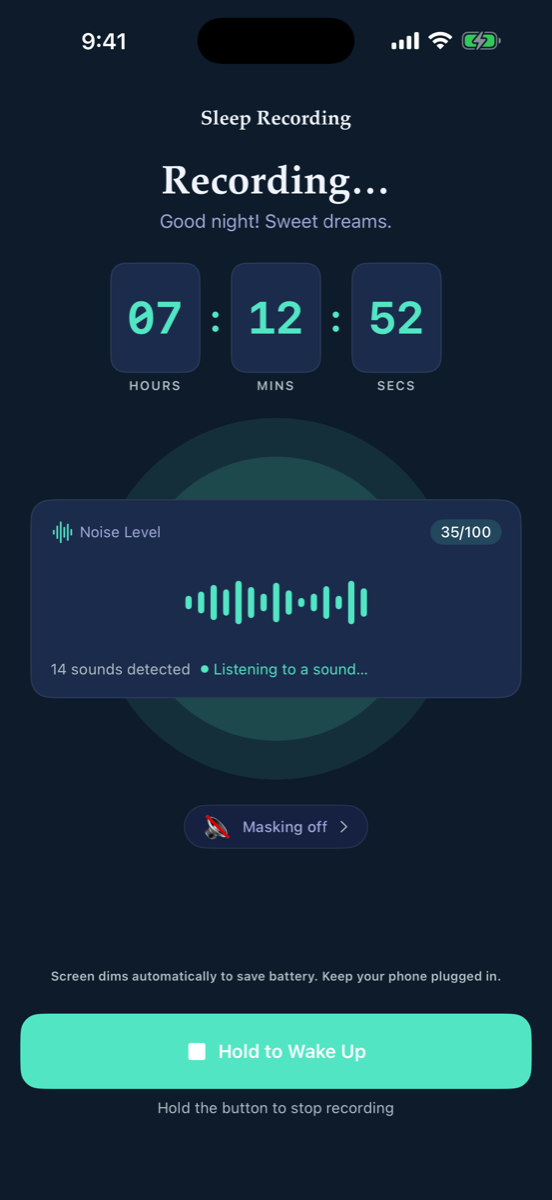
Press start, set the phone on your nightstand, and SoundSleep captures and analyzes audio in real time. Turn on smart masking and steady white, pink, or brown noise boosts itself the moment snoring starts, then eases back. The screen dims to near-black to save battery.
- Live waveform, a running sound count, and an honest 0–100 noise index
- Smart masking — reactive white, pink, or brown noise, synthesized on the fly
- Live Activity on your Lock Screen, and it recovers from calls and alarms on its own
Snoring or sleep talking? Hear it for yourself.
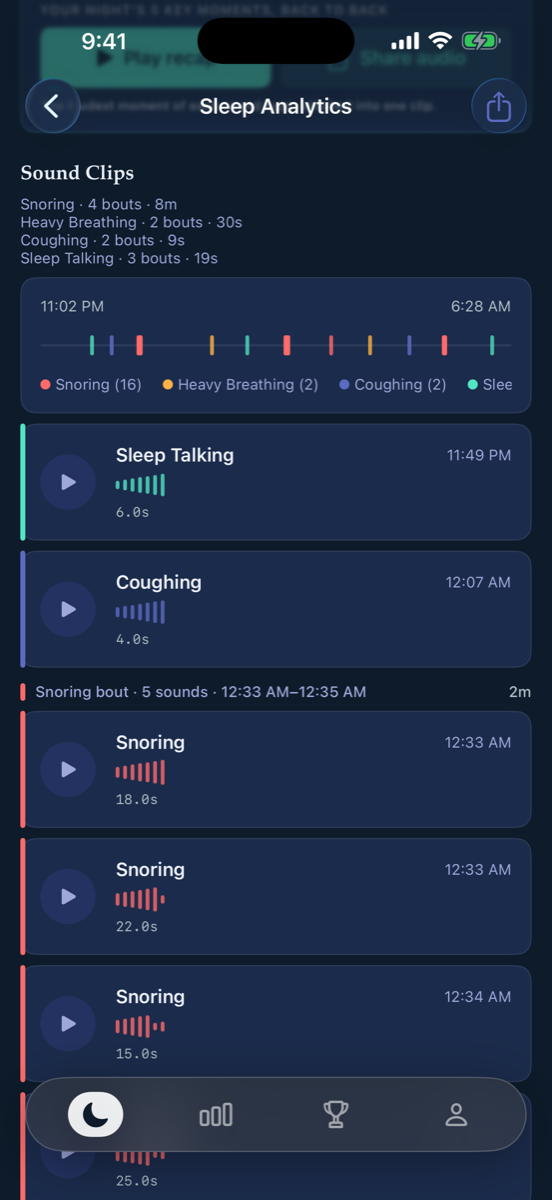
Most apps just measure loudness. SoundSleep classifies each event on-device — snoring, heavy breathing, coughing, sleep talking — groups them into bouts, and keeps every clip. Play, pause and scrub any clip on its real waveform, drawn from the audio itself. Anything loud it couldn't name is saved as a loud moment, so you can listen and tell it what that was.
- Every sound as a playable clip, grouped into snoring bouts on a color-coded timeline
- Share any sound as a video — the clip, its waveform and your night's date, ready to post
- Night Recap — every key moment of the night cut into one shareable video
Stop guessing. Run the experiment.
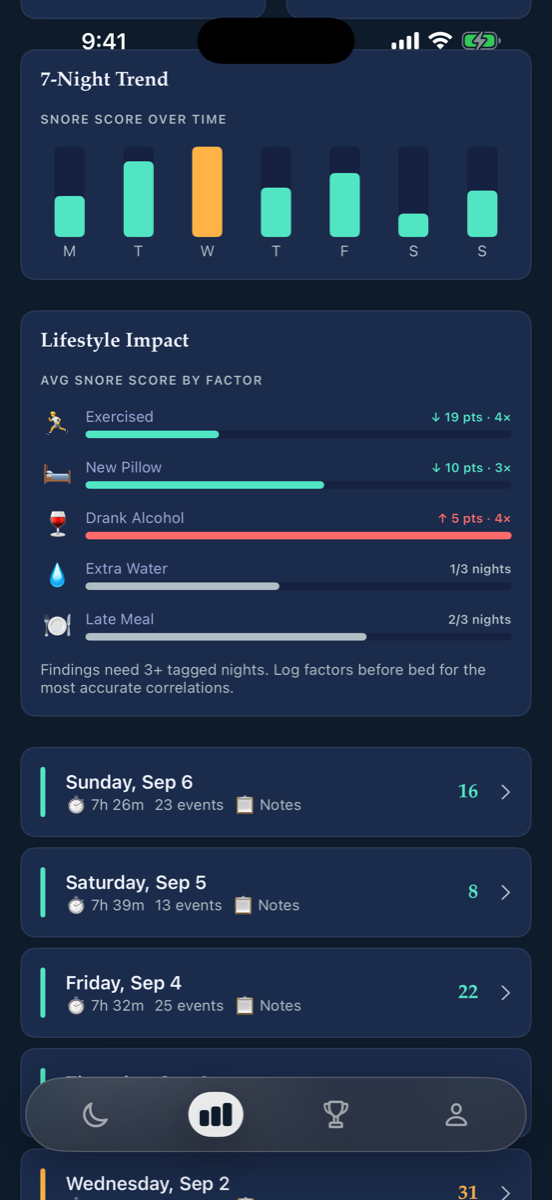
Trend charts and lifestyle correlations show how exercise, a new pillow, or a late drink move your snore score. The Experiments Lab goes further: test mouth tape or side sleeping on alternating ON/OFF nights and get a real verdict from your own data.
- 7-night and monthly trends, plus a lifestyle impact ranking of what helps and hurts
- Experiments Lab — A/B any remedy across nights, with a verdict once there's enough data
- Sleep stages from Apple Watch overlaid on your sounds — see exactly which ones woke you
Know what woke you — even when it wasn't you.
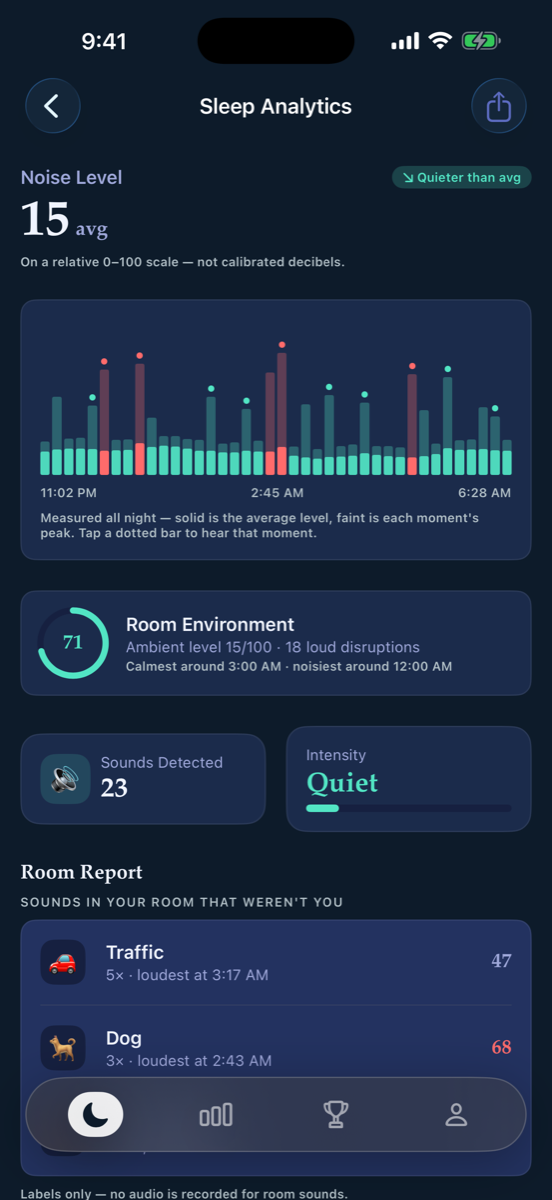
SoundSleep listens to the room, not just to you. Dog barks, traffic, a door, the TV next door — each one is identified, counted, and timed, then folded into a Room Environment score so you can see how calm your bedroom really is. Tap any of them to rename it in your own words, label single moments, or hide it from every future report. Room sounds are labels only; no audio is ever recorded for them.
- A full-night noise timeline measured every 30 seconds — average and peak
- Room Report — the sounds in your room that weren't you, with the loudest time for each
- Environment score with your calmest and noisiest hours — free for everyone
- Call it “my fan” instead of “appliance” — or hide it, and it stops being reported
A better sleep routine that sticks.
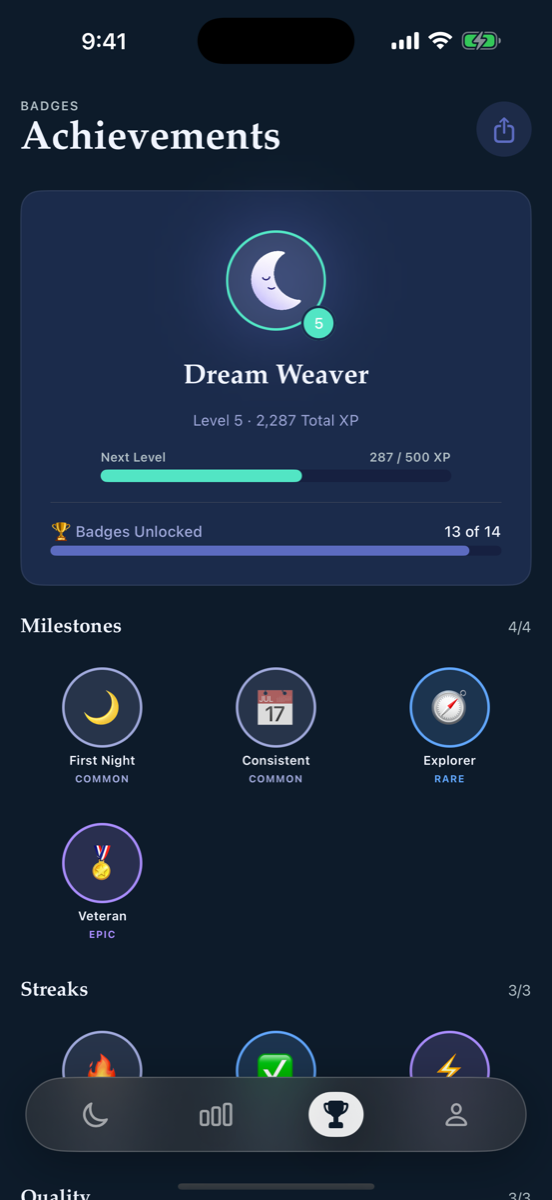
Quality-weighted XP, real consecutive-night streaks, levels, and a wall of badges turn tracking into a habit you keep. Teaching the app pays too: every sound you name earns Sound Trainer XP and a rank, from First Label to Sound Sage. A Home Screen widget shows last night's score, a morning notification tells you what it caught, and a Sunday digest sums up the week.
- Levels, XP, and a celebrated streak that rewards consistency
- Milestone, streak, quality and Sound Trainer badges to collect
- Widgets, a morning report notification, bedtime reminders, and a weekly digest
Everything inside
Thoughtful from nightfall to morning
Real-time capture
Records just the moments that matter as compact AAC clips, with a full-night noise timeline measured every 30 seconds.
Sound classification
Snoring, heavy breathing, coughing, and sleep talking — labeled on-device, grouped into bouts, every clip playable.
Your own labels
Call a sound “my fan” or “my partner.” Your labels are saved, offered again next time, and teach the app your room.
Share as video
Turn any clip, or the whole night, into a branded video with the waveform, the time and the date — then post it.
Loud moments
Loud sounds the classifier couldn't name are kept too. Tap the spike, listen, and tell the app what it was.
Room Report
Dog, traffic, door, TV — every sound in your room identified and timed, with a Room Environment score.
Smart masking
White, pink, or brown noise that boosts itself the moment snoring starts, then eases back. Nothing to download.
Experiments Lab
Test mouth tape, side sleeping, or no late coffee on ON/OFF nights and get a real verdict.
Sleep stages
Overlay Apple Watch sleep stages on your sounds and count the awakenings a noise caused.
Night Recap video
The loudest moment of each sound type cut into one shareable video, with your night's date and stats.
Widgets & Live Activity
Last night's score on your Home Screen; the recording live on your Lock Screen.
Doctor-ready reports
Export a clinician-ready PDF for one night or a whole period, or raw CSV of any session.
Health sync
Opt in to write your sleep sessions to Apple Health or Health Connect and keep everything in one place.
Private by design
Audio is analyzed and stored on-device under a storage budget. Room sounds are labels only. Backups are yours to keep.
How it works
Three steps to a clearer night
Tap start at bedtime
Set your phone on the nightstand and press Start Sleep Tracking. Turn on masking if you like; the screen dims itself and SoundSleep takes over.
It listens & classifies
Through the night it labels every sound on-device, keeps the loud moments, measures the room, and identifies what else is making noise — no uploads, no streaming.
Wake up to insight
Morning report ready: your score, every clip, the Room Report, your environment score, and a recap you can share.
Questions
Good to know
Does my audio get uploaded anywhere?
No. All capture, classification, and analysis happen on your phone using on-device machine-learning sound models (Apple's SoundAnalysis on iPhone, YAMNet on Android). Clips are saved locally as compressed AAC files and bounded by a storage budget — nothing is streamed or uploaded to a server.
How is it different from a normal snore tracker?
Most apps only measure how loud the room is. SoundSleep classifies what it hears — snoring, heavy breathing, coughing, sleep talking — keeps every clip so you can listen back, saves the loud moments it couldn't name, and identifies the room sounds that weren't you. Then it lets you test remedies with real ON/OFF experiments.
Will it run all night without draining my battery?
The recording screen dims to a near-black display to conserve power and keeps the device awake while monitoring. We recommend keeping your phone plugged in overnight, as the on-screen prompt suggests.
What can the app do?
Overnight monitoring, snore detection and scoring, full sound classification, the full-night noise timeline and Room Environment score, playable clips you can scrub and share as a video, your own labels for any sound, the Room Report, Night Recap, smart masking, the Experiments Lab, sleep stages, trends, doctor-ready PDFs, widgets, backups and the weekly digest. Some of it is free and some is part of the paid upgrade — the app always shows you which is which.
What are "loud moments"?
Sometimes something is loud enough to wake you but the classifier isn't sure what it was. Instead of throwing it away, SoundSleep keeps the loudest of those as playable clips and marks them on the noise chart. Listen, then tell the app what it was — it learns the label, and if it was snoring or sleep talking it's counted with the rest.
How does smart masking work?
SoundSleep synthesizes white, pink, or brown noise on the phone itself — nothing to download. While recording, it listens for snoring and raises the volume the moment it starts, then eases back down when it stops. The microphone compensates for the masking sound so it doesn't count as a sleep sound.
Does the Room Report record my room?
No. Room sounds — a dog, traffic, a door, a TV — are identified on-device and stored as labels with a time and a loudness only. No audio is saved for them. Only your own sleep sounds are kept as clips, and those never leave your phone either.
Do I need an Apple Watch?
No. Everything works with just your phone. If you do wear an Apple Watch to bed, SoundSleep can read its sleep stages from Apple Health and overlay them on your sounds, so you can see which noises coincided with an awakening.
Does it work with Apple Health or Health Connect?
Yes — opt in from Settings and SoundSleep can write your sleep sessions to Apple Health on iPhone or Health Connect on Android. If access isn't granted, the toggle reverts and explains why; nothing is shared without your permission.
What do I need to run it?
An iPhone running iOS 16 or later, or an Android phone running Android 8.0 or later. There is no account to create and nothing to sign in to — open the app and start tracking.
Sleep smarter, every night.
Put SoundSleep on your nightstand tonight and wake up knowing exactly what happened — every clip, every room sound, privately, on your own phone.